

Executive presence on video conference calls is your ability to project confidence, authority and empathy through a screen, through the camera, your voice and how you make others feel, so a remote room trusts your judgement and follows your lead. On video, presence is less about filling a room and more about clarity, calm and command in a small rectangle. It is now a core leadership skill, not a nice-to-have.
Picture a VP of operations in Bengaluru joining a board video conference call to propose a ₹300 crore restructuring plan. Camera at eye level, lighting clean, voice steady. When a board member pushes back, she pauses, acknowledges the concern, and answers with two sentences of hard data. The proposal clears in under forty minutes. That is executive presence on video conference calls in practice.
Leadership presence has migrated permanently from physical boardrooms to Zoom, Microsoft Teams and Google Meet. One in five workers globally now works remotely, and 98% of employees want to work remotely at least some of the time, according to global 2024 workforce data compiled by the University of Pennsylvania LPS. The direction in Indian corporates is the same: hybrid schedules are now standard for most white-collar roles, so a large share of leadership interactions, especially the ones that shape how you are judged, happen through a webcam. The ability to project confidence, clarity and calm on camera is now a vital skill for every leader in every organisation.
What You’ll Learn in This Guide
- The technical setup, body language and vocal delivery that build executive presence on every video call
- India-specific tactics, cross-cultural calibration, a tiered ₹ tech stack and bandwidth-proof habits
- How to adapt your presence across 1:1s, team meetings, board calls and webinars
- How to hold authority through screen sharing, difficult questions, technical failures and back-to-back calls
- A learning path, self-paced courses versus coached programmes, with indicative Indian pricing, to develop and measure your presence over time
- A 30-day challenge and a 12-point self-assessment rubric you can run on your own recorded calls
What Is Executive Presence on Video Conference Calls?
Executive presence on video conference calls is the set of signals, sent through your camera, your voice and your conduct, that makes a remote audience believe you, follow your reasoning and trust your judgement, even when all they see is you from the chest up in one tile of a crowded grid. It rests on how you look, how you sound and, above all, how you make participants feel: heard, safe and clear on what happens next. Developing executive presence on video calls means adapting traditional leadership qualities to a digital medium.
Classic executive presence rests on three pillars, gravitas, communication and appearance, and each translates differently when your audience sees you through a rectangle. Effective communication is crucial for executive presence, and your interpersonal style, how you listen and hold space, gets magnified in a virtual setting where body-language cues are limited.
Quick self-diagnostic (2 minutes): Record a two-minute clip of yourself explaining a current project to camera. Watch it once and score yourself 1–5 on three things, look (framing, lighting, posture), sound (pace, filler words, clarity), and feel (would a stranger trust and follow you?). Whichever pillar scores lowest is where you start. If you are early in your career and everything feels like a priority at once, fix look first, framing, lighting, audio, because a clean signal is what earns you the benefit of the doubt before you have the seniority to fall back on.
Why the “feel” score matters most: Albert Mehrabian’s often-cited research applies to one narrow thing, how we communicate feelings and attitudes, not factual content, and only within that narrow band do the famous numbers hold: roughly 7% of the emotional impact from words, 38% from tone, 55% from body language. Read correctly, the rule does not mean your words barely matter; it explains why a poorly-lit, flat-sounding delivery undercuts even a strong argument on camera.
The Three Pillars – Gravitas, Communication and Appearance
- Gravitas: Hold steady eye contact with the camera when you deliver critical statements. When a tech glitch freezes your video, respond calmly: “Let me reconnect; please carry on for a moment”, rather than visibly panicking. During Q&A, use concise, assertive language: restate the question, deliver your key point, support it with one example, and stop.
- Communication: Use concrete language: “Our cost overrun is ₹1.2 crore due to supplier delays” beats “we’re over budget.” Deliberately slow your speaking pace to improve clarity and authority, especially for diverse audiences. Vary your vocal energy; in a coach’s rule of thumb, a monotone loses a virtual room within the first minute.
- Appearance: Frame your shot to include head and upper torso with a little headroom. Dress in full professional attire, a well-fitting blazer or structured shirt works for 2026 norms. Avoid visual clutter and distracting backgrounds.
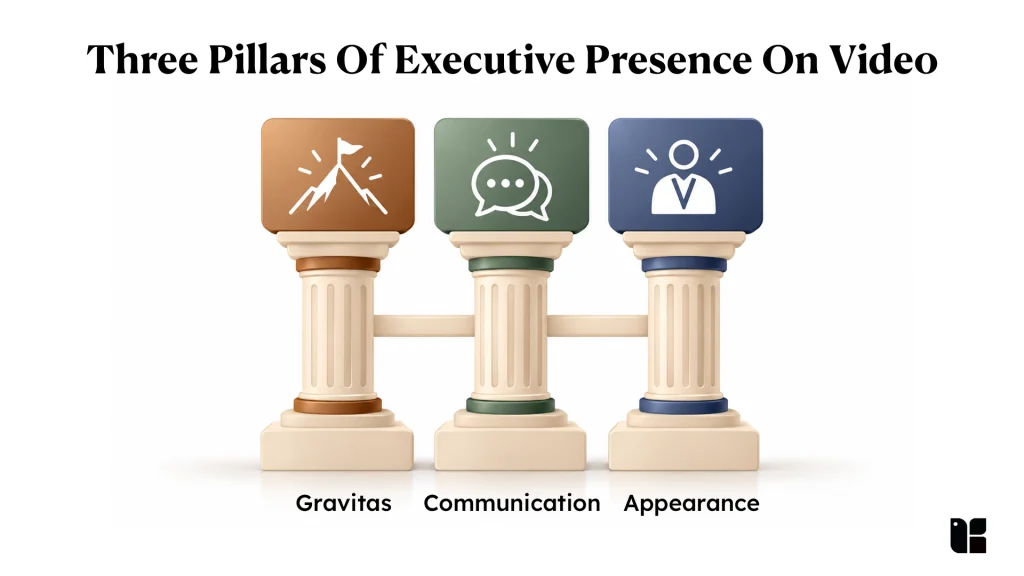
These components reinforce each other. In distributed teams, a brief impression on screen may be the only data point colleagues have, so small lapses in any one area erode perceived professional presence and your ability to inspire trust.
Why Executive Presence on Video Matters Now for Indian Professionals
In India’s hybrid work model, a large share of senior interactions: the skip-levels, reviews and steering calls where leadership forms its impression of you, now happens on video rather than in person. That shift matters most for professionals outside metro head offices, who get far fewer face-to-face executive touchpoints, so their on-camera impression ends up doing much of the work that hallway visibility does elsewhere, quietly shaping how leadership reads their readiness for the next role. The global video conferencing market is projected to grow from $20.32 billion in 2026 to $37.45 billion by 2034, so the shift is structural, not temporary.
Do this now: audit your last three video calls honestly, or ask a trusted peer to rate your gravitas, communication and appearance out of 5 on each. If you are in a tier-2 or tier-3 city away from headquarters, schedule one recurring monthly video check-in with a senior leader, visibility you would otherwise get in the corridor, you now have to create deliberately.
The 7 C’s, 5 C’s and 3 C’s of Executive Presence
Executive presence is often taught through “C” frameworks, and searchers ask about three versions. Short answer first: on a video call, use the 3 C’s, Confidence, Composure, Communication. The 5 C’s and 7 C’s add useful vocabulary, but the 3 C’s are the ones you actually act on. Here is how they map.
- The 3 C’s are the classic core: Confidence, Composure and Communication. On a video call each maps to one concrete behaviour: Confidence, state your recommendation in the first 30 seconds of your speaking turn, before the supporting detail; Composure, count “one-two-three” before answering a hostile question; Communication, lead every answer with the headline, then the evidence.
- The 5 C’s commonly add Credibility and Connection, which matter more on camera than in person because trust has fewer cues to build on.
- The 7 C’s extend the set further, typically adding Charisma and Conviction (some frameworks substitute clarity, character or courage). There is no single canonical list, so treat the 7 C’s as a checklist of leadership qualities rather than gospel.
Core On-Camera Setup: Look and Sound Like a Leader
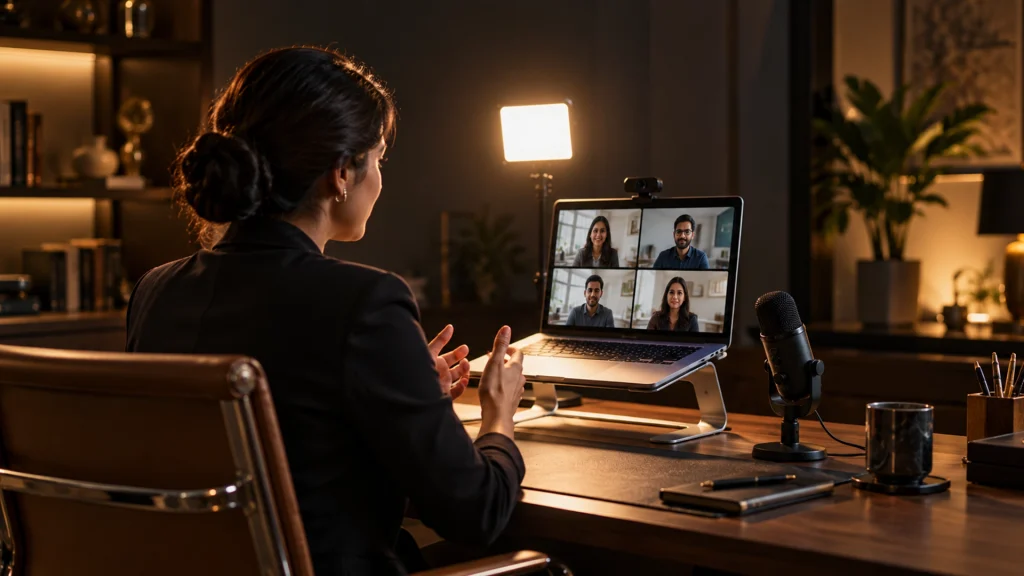
Technical reliability is the foundation of executive presence on video: even the most compelling communicator loses credibility when audio crackles or the picture freezes. Don’t leave it to chance, run this pre-call check before every important meeting.
Pre-call technical checklist
- 10 minutes before: test audio and video in your platform’s settings; join a test call if it’s a high-stakes meeting.
- Check your connection: run a quick speed test and aim for at least 4 Mbps in both directions, which leaves headroom above Zoom’s published requirement of 3.8 Mbps up and 3.0 Mbps down for 1080p HD video.
- Frame and light: camera at eye level, chest-up crop, light source in front of you.
- Kill notifications: close email and chat; silence the phone.
- Backup ready: mobile hotspot on standby and the dial-in number to hand, in case the line drops.
Camera Angle and Framing
Position your camera at eye level to simulate direct eye contact, and frame yourself to show head and upper chest with only a little headroom, the “news anchor” crop that reads as empowered rather than diminished. Looking down at the lens makes you appear to loom; looking up reads as submissive.
Why this matters (depth): A common instruction is to frame head-and-shoulders only. Do not. Cropping too tight removes your hands from the frame, and hand gestures carry a large share of your on-screen expressiveness, cut them out and participants describe you as “flat” or “hard to read” even when your words are strong. Frame chest-up so purposeful gestures stay visible, a practical target is roughly 10–15 cm of headroom above your head, with the bottom of frame around mid-chest.

Lighting That Commands Attention
Use a front light to avoid shadows that obscure your expression. A window facing you (before about 4 p.m.) works well; after that, a ring light or LED panel at 4,000–5,000K is more reliable. Never sit with a bright window behind you.
For Indian home setups specifically, two common pitfalls: overhead CFL tubes and ceiling tube-lights cast harsh top-down shadows and under-eye circles, add a front light to counter them, and west-facing windows blow out your face in the late-afternoon sun, so draw a sheer curtain and switch to your lamp. Affordable options on Amazon India include the Digitek DRL-14C 14-inch ring light with a stand (around ₹1,200–1,400), a larger Digitek DRL-18 18-inch light (around ₹3,000–4,000), or, at the premium end, a Godox LC500R LED stick (around ₹13,500). Prices are indicative and move often, so check the current listing before you buy.
Audio Quality That Signals Professionalism
Use an external USB microphone with a cardioid pickup pattern (it captures your voice and rejects room noise), or a good headset, either avoids the “tinny” laptop-mic sound that quietly erodes authority. Budget USB options sold in India include the Fifine K669B and the Maono AU-PM421, both roughly ₹2,000–5,000 at the time of writing.
Indian home environments add their own audio challenges, ceiling fans, pressure-cooker whistles, and street noise from vendors or traffic. A cardioid mic close to your mouth helps, and software noise-suppression such as Krisp or NVIDIA Broadcast filters out fans and background chatter in real time. Always do a quick echo and level test before a high-stakes call.

A Tiered ₹ Tech Stack for Indian Setups
Most guides recommend premium gear as if budget were no object. Here is a realistic tiered stack for Indian professionals, deliver executive presence at any budget.
| Tier | Budget | What to buy | Presence gain |
| Essential | Under ₹5,000 | Clip-on ring light + wired earphones with mic + laptop riser (or a stack of books) | Eye-level framing, front light, clean audio, 80% of the result |
| Professional | ₹5,000–₹15,000 | 1080p external webcam + USB cardioid mic + small LED panel | Sharper image, broadcast-clear voice |
| Premium | ₹15,000–₹50,000+ | Mirrorless/4K webcam + XLR mic + key light + acoustic treatment | Studio-grade presence for board and investor calls |

Background and Environment
Keep your background simple, two or three objects that reinforce your professional identity (books, a certification, minimal art) in neutral colours. Physical backgrounds are generally preferred to virtual ones: the slight processing lag and edge artefacts of a virtual background make you look less crisp and quietly signal insecurity about your environment. A real but tidy background reads as authentic confidence.
Bandwidth and Connectivity in India
Video calls expose infrastructure realities that in-person meetings masked, power cuts, variable bandwidth and shared-housing noise are genuine constraints for many Indian professionals, and pretending “just get a good setup” ignores them. Test your line for at least 4 Mbps in both directions, the target in the checklist above; use wired Ethernet where you can; and keep a mobile hotspot as backup. For critical calls, pre-distribute slides and keep a phone dial-in ready so a power cut never becomes a presence collapse.
On-Camera Body Language and Vocal Delivery
Nonverbal communication gets amplified on video: viewers see you chest-up in close-up, so quirks that would vanish in a conference room become focal points. Since tone and body language carry the bulk of emotional signal (the Mehrabian ratio above), your delivery fills the gap left by the absence of a shared room.
The three body-language mistakes to fix first, in order:
- Framing so tight your hands never appear
- Staring at your own self-view instead of the lens
- Over-nodding that reads as anxiety
The subsections below tackle each.
Posture and Gestures
Maintain an upright posture to project energy and engagement, sit grounded, both feet on the floor, shoulders back. Use purposeful gestures to reinforce points; keep hands visible, open palms when inviting input. Avoid slouching, sweeping arm movements that go offscreen, or fidgeting with a pen.
Self-review check: in your next recorded call (see the rubric under Measuring and Improving below), watch with the sound off; if your hands never enter frame, or the same gesture repeats on a loop, adjust your framing and vary your movement. One India-specific note for cross-border calls: the Indian head-nod/wobble that signals “yes, I’m with you” at home is often misread by Western colleagues as ambivalence, so on global calls pair it with a short verbal confirmation (“agreed”, “that works”).
Eye Contact, and Its Limits
Look into the camera lens when delivering key messages; place a small dot near your lens as a reminder. When listening, shift your gaze to faces on screen.
When it fails (counter-case): The standard “always look at the camera” advice works for a 2–3 minute presentation, but it is unsustainable across a 60-minute discussion where you genuinely need to read participants’ reactions. The consensus over-simplifies. The honest technique is strategic camera glancing: look into the lens during your key persuasive points, and read participants’ faces the rest of the time. Presence is knowing which moments deserve the lens, not staring at glass for an hour.
Facial Expression
Start with a neutral-to-positive resting expression and use intentional smiles at openings, transitions and closings. Because the video screen is small, slightly exaggerated expressions convey meaning better than the subtle cues you would use in person, a frozen frown or an artificially permanent grin both read as inauthentic. Watch for this: many people discover on playback that their resting “listening” face reads as annoyed or bored on camera; a small, deliberate lift at the brow and mouth fixes it.
Vocal Tone, Pacing and Strategic Silence
Because digital mediums dampen energy, speak with slightly higher volume and more vocal energy than in person, but keep your pace a little slower than in conversation and drop into a lower vocal range to sound authoritative. Use strategic pauses, before and after key points, instead of filler words, and vary your tone to avoid monotony.
See it in practice (depth): watch how experienced CEOs field analyst questions on a public earnings call. Many pause before answering, visibly consider the question, then synthesise. It works because, once you have established credibility, strategic silence signals thoughtfulness rather than hesitation. Try it: on your next tough question, count “one-two-three” before answering. The pause you fear reads as dead air is read by others as command.
Active Listening Without Faking It
Active listening is crucial for effective communication on video calls, reference what others said by name, and paraphrase to show you followed.
When it fails (counter-case): The usual advice: “nod visibly, use lots of verbal affirmations”, backfires when overdone. Excessive nodding, constant “hmm” sounds and exaggerated reactions actually signal anxiety, not confidence. In practitioners’ experience, seasoned leaders demonstrate listening through stillness, visible note-taking and one well-placed paraphrase, not continuous motion. If you are performing engagement, you look nervous; if you are genuinely processing, you look in command.
Pre-Call Preparation and Mental Readiness
Most guides stop at the physical setup. The bigger gap is the mental shift from casual video-chat mode to executive mode, the two-minute reset that decides how you show up.
Do not just “prepare mentally.” Run a 3-minute pre-call routine: review participant backgrounds on LinkedIn, identify whose voice you need to draw out, write down the one concrete outcome you want from the call, and take three slow power breaths. Naming the outcome in advance is what lets you steer the meeting rather than react to it, and it is the difference between attending your own call and leading it.
“Up until now, I would focus on answering the question in front of me. Through Kapable, I’ve started looking beyond the immediate question to understand what the conversation actually needs from me. I’m becoming more conscious of how I structure my thoughts, create clarity and contribute to alignment, rather than simply providing the technical answer.”
– Deepak Anand, AVP JP Morgan Chase
Adapting Your Presence for Different Meeting Types
A single “presence” setting for every call is a mistake, a 1:1 skip-level needs warmth and curiosity, a board presentation needs decisiveness and brevity, a client pitch needs consultative authority. Conflating these contexts erodes credibility faster than bad lighting.
- 1:1s: Warmth first. Camera on, fewer notes, more listening. Draw the other person out.
- Team meetings: Facilitation. Run a tight agenda, invite quieter voices by name, synthesise decisions.
- Board / investor calls: Decisiveness and brevity. One key visual per slide, lead with the headline number, answer in the restate-point-example-stop shape.
- Webinars / large calls: Performance energy. Higher vocal variety, deliberate pacing, and interaction through polls and chat.
Persuasive Communication in Virtual Settings
Persuasive communication enhances leadership influence, and it becomes more critical on video where you cannot rely on physical proximity. Use a simple structure for proposals: Problem → Insight → Solution → Impact → Ask. Anchor data in a short story so abstract numbers stick, and when someone objects, pause, restate the concern, acknowledge it, respond with evidence, and check for alignment.
Realistic Scenarios: Budget, Greenlight, Policy
For a budget approval, lead with a financial forecast chart (one visual per slide), address the cost impact, invite questions, then run a quick confidence poll. For a project greenlight, share a short prototype demo, compare two options side by side, and close with a deadline and named owners. For a policy change, present the rationale, show benchmarking data, address likely objections, then state the decision and implementation steps.
A quick anonymous poll: “On a scale of 1–5, how ready are you?”, surfaces hidden resistance faster than asking “Any concerns?” to a silent room.
Maintaining Presence During Screen Sharing
When you share slides, you often shrink to a tiny box or disappear entirely, and your presence goes with you. This is one of the least-covered risks in virtual leadership.
Try this (depth): use a “preview frame” before you share. While you are still full-screen on camera, spend about 20 seconds previewing the one slide that matters, then share the deck. It keeps the human connection alive before you vanish into presenter mode. Keep your camera on in a corner (picture-in-picture) throughout, narrate to a 10-word headline rather than reading slides verbatim, and return to full-screen the moment the data point lands.
Leading Hybrid and Multicultural Video Conference Calls
Leading calls where some sit in a conference room and others join remotely across time zones introduces complex challenges. Meeting equity, ensuring remote attendees are not sidelined, is now a defining feature of inclusive leadership.
- Hybrid etiquette: Favour the camera and speak toward remote participants first. Avoid the “bowling-alley” view where remote workers see a long table of tiny faces, have each in-room attendee join on their own laptop (mics muted) so everyone shares the same micro-expressions.
- Time zones: Rotate meeting times so no region is chronically disadvantaged, a signal of ethical leadership across a diverse network.
- Ground rules: “One speaker at a time,” “chat for side comments,” “pause after each section for questions.” Do not assume silence means agreement.
- Language: Slow down, avoid idioms that confuse non-native speakers, and summarise decisions in simple vocabulary.
Cross-Cultural Presence: India vs US vs UK vs Singapore
Executive presence norms are not universal, and Indian professionals on global calls navigate a real double standard, you are expected to adapt to Western directness, while Western colleagues rarely adapt to Indian context. Being too direct can read as abrasive to Indian teams; being too deferential reads as weak to global stakeholders. This comparison is your calibration guide.
| Norm | India | United States | United Kingdom | Singapore |
| Directness | Contextual; respect for hierarchy | High; get to the point | Moderate; understatement valued | Moderate; harmony-conscious |
| Interrupting | Reads as disrespectful | Often accepted, even expected | Discouraged | Discouraged |
| Silence | Can signal deference | Read as hesitation | Tolerated | Comfortable, thoughtful |
| Disagreement | Often indirect | Direct is fine | Softened (“I wonder if…”) | Face-saving, private |
Honest complexity (depth): In Indian corporate culture where hierarchy runs deep, the leaders who command the most respect on video often interrupt less, create space for junior voices, and synthesise rather than dominate, the opposite of the “speak more to seem confident” instinct.
Handling Conflict, Difficult Questions and Crises on Video
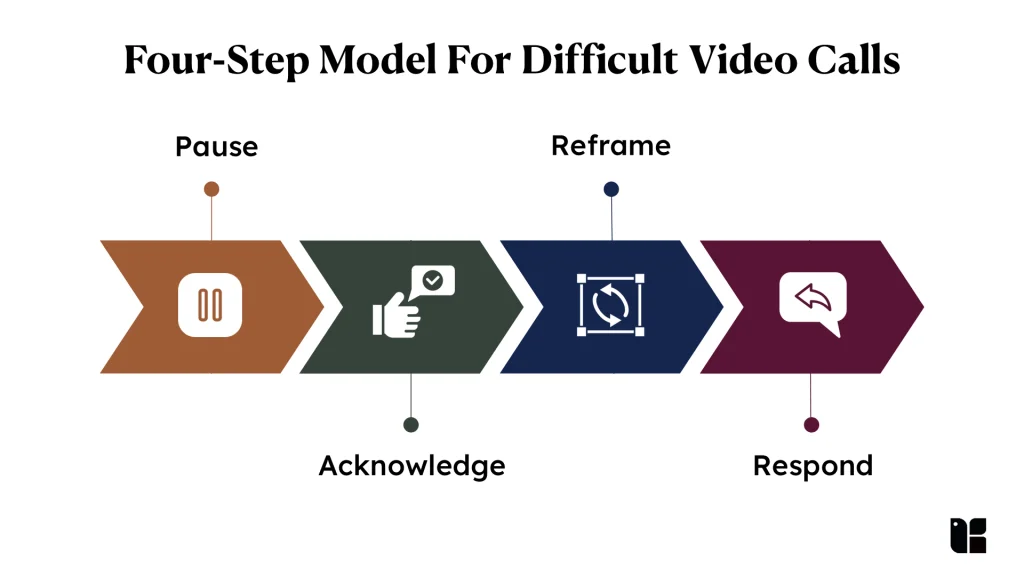
How you handle tension on a live call leaves a lasting impact on how others read your leadership presence, composure under pressure is the ultimate test of gravitas. A simple four-step model keeps you steady in the moment: Pause -> Acknowledge -> Reframe -> Respond. Pause a beat, acknowledge the concern or emotion, reframe around the shared goal, then respond with evidence.
- De-escalate: In a tense moment, slow your voice and drop your volume slightly below your normal call level; a calm tone is contagious. Acknowledge emotion: “I can see this is frustrating. Let’s work through it.”
- Aggressive questions: Pause, clarify (“Are you asking about the timeline or the budget?”), answer concisely, and offer to follow up offline if it needs a deep dive.
- Reframe: “Our shared goal is X, let’s focus on what gets us there.”
“I used to get frustrated when people didn’t understand what I was asking them to do. Through Kapable, I became more conscious of pausing, understanding their perspective and adapting how I communicate. I’ve also learned to create clearer structures and expectations that give people more space to learn, take ownership and grow. That shift has helped me move from simply getting the work done to thinking more intentionally about how I lead.”
– Chirag Shah, Founder IronThrone Engineering
Recovery Techniques for Presence-Breaking Moments
Everyone has a dog bark, a child walk in, a power cut, or a freeze mid-sentence. Interruptions and technical failures do not damage your authority permanently, how you recover often builds more presence than a flawless performance, because it demonstrates grace under pressure.
When it fails (depth): The failure is not the interruption; it is over-apologising. Acknowledge once (“Apologies, let me pick that back up”), reframe, and continue from memory if the screen share drops. Picture a quarterly update where a data table fails to load: instead of stalling, you say you will walk the numbers verbally, cover the two figures that matter, and bring the visuals back when they return. Reading the room’s anxiety and responding with steadiness is emotional intelligence in action.
Sustaining Executive Presence Across Back-to-Back Calls
Indian executives routinely juggle early-morning calls with Western time zones and late-evening calls with APAC partners, 6 to 8 consecutive video calls in a day is normal, and visible fatigue erodes authority. Bringing high energy to the 9 a.m. call but going flat by the 4 p.m. call is read as disinterest, not tiredness.
Do this (depth): build 5-minute “presence resets” into the gaps between meetings: step away from the desk, do a quick posture and shirt check, and spend 30 seconds reviewing the next meeting’s participant list and intended outcome. Treating each call as a distinct performance rather than a continuous blur is what keeps presence steady from the first call to the last. Build energy modulation into your day, not just your first meeting.
Presence by Role: C-Suite, Middle Management and Emerging Leaders
Executive presence is not one-size-fits-all across seniority. The requirement shifts with your role.
- Emerging leaders: You lack in-person seniority cues, so command respect through preparation and clarity, arrive with the outcome named, speak in the restate-point-example shape, and let stillness signal composure. Worked example: a first-time team lead running their opening sprint-planning call keeps the camera on, opens with the single decision the call must reach (“by the end of this call we’ll have committed the sprint scope”), invites the two quietest engineers to weigh in by name, and closes by reading back who owns what by when. No ₹300 crore proposal required, the same three moves (name the outcome, draw people out, confirm ownership) read as leadership on a team standup exactly as they do in a boardroom.
- Middle management: Your job is facilitation authority, running tight calls, drawing out the team, and translating up to leadership. Presence here is credibility plus decisiveness.
- C-suite: Brevity and gravitas. Fewer words, longer pauses, and the confidence to let silence do work. At this level, over-explaining reads as insecurity.

Common Mistakes That Undermine Executive Presence, and How to Fix Them
| Mistake | Fix |
| Multitasking on camera (email, Slack) | Close every window except the meeting; wandering eyes are visible to everyone |
| Over-compensating with a stiff, British-formal register | Be authentic; a robotic delivery erodes trust faster than an imperfect one |
| Presence collapse in Q&A (deflating when challenged) | Practise the shift from presentation mode to conversation mode before the call |
| Staying on mute until you speak | Manage noise with push-to-talk so interjections feel spontaneous, not permission-seeking |
| Reading slides verbatim | Speak to a 10-word headline; treat the slide as backdrop, not script |
| Ignoring remote participants | Call on remote members by name before in-room ones |
| Starting late | Join 3 minutes early, test tech, begin on time |
| Code-switching your register mid-call (India-specific) | On mixed India-global calls, flipping between a formal “Western” register and a casual local one mid-sentence reads as uncertainty; pick one register and hold it |
For your next three calls, pick the one mistake you know you commit and focus only on that. Small, intentional changes compound.
Measuring and Improving Your Virtual Executive Presence
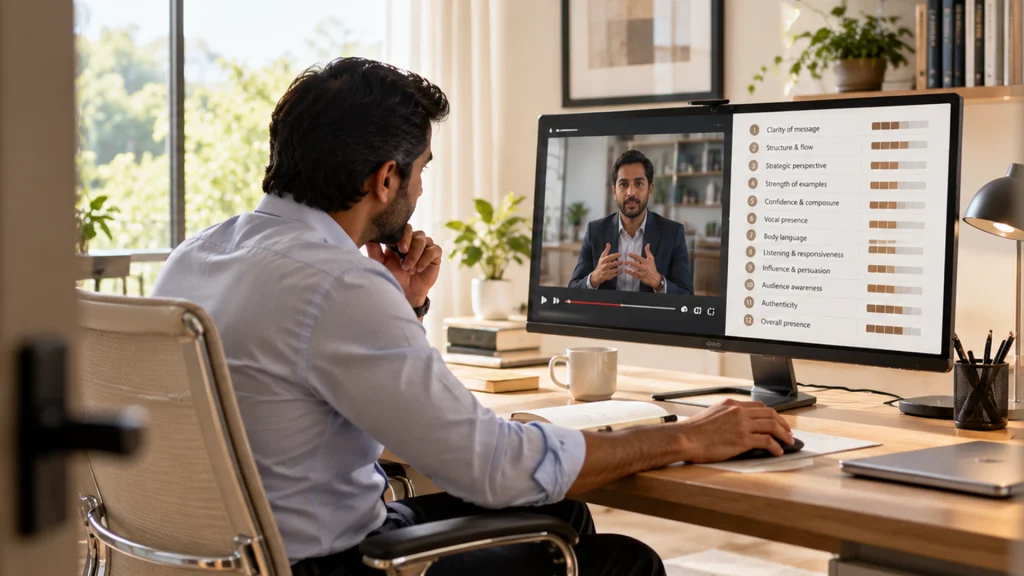
If you can’t measure it, you can’t improve it. Track a few observable indicators rather than relying on gut feel.
- Quantitative: decision-cycle time (proposal to decision), meeting duration vs agenda time, camera-on and chat engagement rates, and follow-through on action items.
- Qualitative: short post-meeting pulse surveys (“Was the message clear?”), targeted 1:1 questions, and specifically asking remote colleagues, whose view often differs from in-room attendees.
Reader’s next action (depth): Record yourself in a typical team meeting and review it twice, once with sound off (to isolate body language) and once with video off (to isolate vocal patterns). Then score the recording on this 12-point rubric, one point for each criterion you meet:
| # | Criterion | What earns the point |
| 1 | Framing | Chest-up crop, hands visible, a little headroom |
| 2 | Camera height | Lens at eye level, not looking down or up |
| 3 | Lighting | Face evenly lit from the front, no backlight |
| 4 | Eye-contact discipline | Lens contact on key points, faces the rest of the time |
| 5 | Posture | Upright and grounded, no slouch or lean |
| 6 | Gestures | Purposeful and inside the frame, no fidgeting |
| 7 | Facial expression | Resting face reads neutral-to-positive, not annoyed or bored |
| 8 | Pace | Measured, a little slower than conversation |
| 9 | Filler words | Few “um”, “so” or “basically” fillers |
| 10 | Pause comfort | You hold a pause before key points and hard answers |
| 11 | Clarity | Every answer leads with the headline |
| 12 | Listening signals | Stillness and one paraphrase, no over-nodding |
Self-assessment alone is unreliable: organisational psychologist Tasha Eurich’s research found that although most people believe they are self-aware, true self-awareness is rare. So also ask 2–3 trusted colleagues to rate your confidence, clarity and concision on a 5-point scale. Reassess every 30–60 days.
How to Learn Executive Presence: Structured Programs and Courses
Executive presence on video is a performance skill that develops over months of deliberate practice, not a single workshop, but a structured course or programme accelerates what self-study cannot, adding live coaching, peer practice and feedback on your real calls. Such courses typically run around six weeks. If you are searching for an online course or a downloadable programme, the useful question is not which is “best” but which format fits your goal and budget.
When you evaluate any option, look for four things:
- Live coaching (not just recorded lectures)
- A curriculum matched to your role
- Practice with feedback on recorded calls
- Outcomes you can point to in a review
Here is how the main formats available to Indian professionals compare:
| Option | Format | Indicative price (India) | Coaching | Best for |
| LinkedIn Learning (e.g. Jessica Chen’s course) | Self-paced video | ~₹1,500/month subscription | None | Fundamentals, on your own time |
| Dale Carnegie India | Group workshop | Varies by cohort | Group facilitator | Structured group setting |
| University executive education (e.g. ISB) | Cohort programme | Higher, cohort-based | Faculty-led | Credential + network |
| Kapable, Leadership Acceleration | Live 1-on-1 | ₹1,77,000 + taxes | Personalised coach | Role-specific, promotion-focused prep |
(Prices and availability change, confirm current details with each provider. Comparison offered so you can choose on fit, not as an endorsement of any single option.)
Match the format to the stakes. To build the basics cheaply, a self-paced course covers a lot of ground. If a promotion is on the line and you need feedback on the specific calls you lead, a coached programme is the only format that delivers it, Kapable’s Leadership Acceleration Program is built around exactly the promotion-critical video calls this guide covers.
Listen: The Essentials: Executive Presence, a Harvard Business Review podcast episode on improving influence and impact while keeping virtual audiences engaged.
Conclusion: Turn Every Video Conference into a Leadership Stage
Executive presence, leadership presence and persuasive communication converge on video to shape your trajectory as an influential leader. Every call, from a weekly standup to a board update, is a chance to build trust, project confidence and drive outcomes that create a lasting impact. Your action plan for this week:
- Upgrade one technical element, reposition your camera to eye level, add a front light, or switch to an external microphone.
- Script the opening of one key call, a 30-second opening that states the objective and frames the agenda.
- Ask for feedback, message one colleague after that call: “On a scale of 1–5, how clear and confident did I come across?”
Rather than a pep talk, work a simple 30-day executive-presence challenge, one focus per week:
- Week 1, Setup: fix camera height, front lighting and audio; run the pre-call checklist before every meeting.
- Week 2, Delivery: practise the count-to-three pause and lead every answer with the headline.
- Week 3, Listening & recovery: cut the over-nodding; rehearse the Pause-Acknowledge-Reframe-Respond model for hard questions.
- Week 4, Measure: record two calls, score yourself on the 12-point rubric, and get one colleague to rate you 1-5.
Screenshot this list and tick a week at a time. In a world where screens are permanent fixtures of leadership, the people who treat every call as practice are the ones who get seen as ready for the next role.
Frequently Asked Questions
Q1. What are the 7 C’s of executive presence?
The 7 C’s are a checklist of leadership qualities often cited for executive presence, commonly Confidence, Composure, Communication, Credibility, Connection, Charisma and Conviction (some lists swap in clarity, character or courage). There is no single canonical list, so treat them as a rounded set of traits to develop rather than a fixed formula. On video, the first three, confidence, composure and communication, matter most.
Q2. What are the five Cs of executive presence?
The 5 C’s typically are Confidence, Composure, Communication, Credibility and Connection. They extend the classic three by adding the two qualities that are hardest to build through a screen, credibility (are you believable?) and connection (do people feel seen by you?), which is exactly why they deserve deliberate attention on video calls.
Q3. What are the three C’s of executive presence?
The 3 C’s are Confidence, Composure and Communication, the practical core of executive presence. On a video call they translate to projecting confidence without dominating, staying composed when challenged, and communicating with concise, concrete language. One India-specific nuance: in hierarchical Indian workplaces, “confidence” often reads best as creating space for junior voices and synthesising, not as speaking the most; leaders who interrupt less frequently command more respect on camera.
Q4. How to learn executive presence?
You learn executive presence through deliberate practice plus feedback: record and review your own calls, get honest input from trusted colleagues, and work with a structured course or coaching programme that lets you practise the specific meetings you lead. Expect months of repetition, not a one-time workshop, most executive presence courses run around six weeks and pair live coaching with peer learning.
Q5. Is there an online course that teaches executive presence on video calls?
Yes. Options range from self-paced online courses (such as LinkedIn Learning’s course on executive presence on video conference calls) to live, coached programmes. For Indian professionals seeking role-specific, promotion-focused development, Kapable’s Leadership Acceleration Program delivers executive presence and communication coaching through live 1-on-1 sessions customised to your industry.
Q6. What does good executive presence look like on Zoom?
Good executive presence on Zoom looks like: camera at eye level with a little headroom, clean front lighting, crisp audio, an upright posture, and eye contact into the lens during key points. It sounds like a slightly slower pace, strategic pauses instead of filler words, and concise answers. Above all, it feels like a leader who makes remote participants feel heard and clear on next steps.
Q7. How should executives position themselves on camera?
Sit with the camera at eye level, raise your laptop on a stand or books, and frame yourself chest-up with a small amount of headroom, the “news anchor” crop. Keep your hands within the frame so gestures stay visible, sit on the front half of a structured chair to keep your posture upright, and place a light source in front of you, never behind.
Q8. How to make eye contact on video conference calls?
Look directly into the camera lens (not at faces on screen) when you deliver your key messages, and glance at participants’ faces while listening. Place a small sticker or dot beside the lens as a reminder. Don’t try to hold lens contact for a full hour, use strategic camera glancing, reserving direct lens contact for your most persuasive points.
Q9. How to demonstrate credibility on video conference calls?
Demonstrate credibility with preparation and concrete language: send a clear agenda in advance, lead with the headline number, support claims with one specific example, and follow up within the hour with who-does-what-by-when. Composure under pressure, a calm response to a hard question or a tech failure, builds credibility faster than a polished script.
Q10. What body language mistakes hurt executive presence on camera?
The biggest body-language mistakes are: framing too tight so your gestures disappear, slouching or leaning to one side, staring at your own self-view, over-nodding and exaggerated reactions that read as anxiety, and a frozen or forced facial expression. Fix them by framing chest-up, sitting grounded and upright, hiding self-view, and letting stillness and one genuine paraphrase signal that you are listening.
Q11. What is the best app for conference calls?
The three most widely used platforms are Zoom, Microsoft Teams and Google Meet; the “best” one is usually whichever your organisation and clients already run. For 1080p HD, Zoom publishes a requirement of 3.8 Mbps up and 3.0 Mbps down, so plan for at least 4 Mbps both ways; many Indian broadband and 4G connections can deliver that, though a shared home connection can struggle, which is why a wired line or a mobile-hotspot backup matters. What decides your executive presence is not the app but your setup and delivery, camera, lighting, audio, and how you lead the call.


